Contour Generator: The Retro Display Font for Handmade Brands
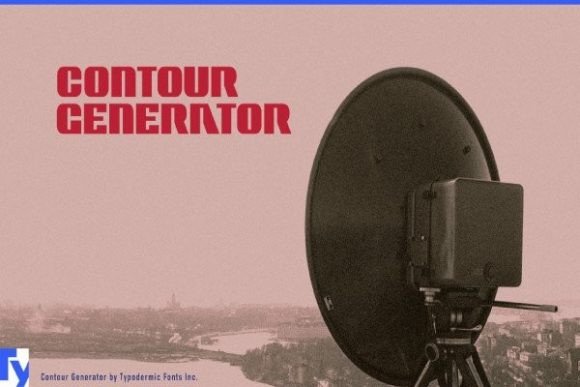
When you are running a handmade business or creating digital downloads, the right typeface can be the difference between a product that looks like a hobby and one that feels like a premium brand. I have spent years testing various fonts for my stickers, labels, and printable stationery, but few have captured my attention quite like Contour Generator. This display font brings a distinct retro techno vibe reminiscent of the 1960s era of consumer electronics. It offers a unique aesthetic that stands out in a sea of modern minimalism, providing that golden touch your designs need to catch the eye.
For creators using Cricut, Silhouette, or other cutting machines, finding a font that cuts cleanly while maintaining visual impact is crucial. Contour Generator delivers on both fronts. Its geometric structure ensures that even at smaller sizes, the characters remain legible and crisp. Whether you are crafting custom candle labels, designing wedding invitations, or creating bold wall art, this creative font adds a layer of nostalgia and sophistication that instantly elevates the perceived quality of your work.
Bringing Vintage Charm to Modern Crafts
The personality of Contour Generator is unmistakable. It blends the clean lines of mid-century modern design with a slightly industrial edge. When applied to physical products, it creates an immediate sense of character. Imagine placing a jar of homemade soap on a shelf; a label printed with Contour Generator doesn't just list ingredients, it tells a story of craftsmanship and timelessness. This makes it an excellent choice for boutique tags, product packaging, and seasonal craft designs where you want to evoke a specific mood.
I often recommend this commercial font for businesses that want to build a strong brand identity without looking generic. The font works exceptionally well for short phrases, names, and titles. Because it is a display typeface, it is designed to make a statement rather than carry long paragraphs of text. Think of using it for the main title on a greeting card, the headline on a flyer, or the logo on a tote bag. The bold, structured shapes command attention, making your product pop in social media graphics and online listings alike.
For those selling digital printables, such as planner pages or wall art, Contour Generator offers a versatile solution. You can use it to create headers for planners that feel both organized and artistic. On a larger scale, it transforms simple wall decor into conversation pieces. A farmhouse sign featuring this font takes on a new dimension, blending rustic charm with a sleek, futuristic twist that appeals to a wide range of interior styles.
Practical Applications for Small Business Owners
One of the most common questions I get from fellow sellers is how to apply different styles effectively. With Contour Generator, the possibilities are vast. For example, if you are launching a line of holiday gifts, you can use this font for festive tags that stand apart from traditional serif or script options. The retro-tech feel adds a modern edge to classic holiday themes, making your products feel fresh and contemporary.
- Candle and Soap Labels: Use the font for the brand name on the front of the label, ensuring it remains readable even on small jars. The high contrast helps customers identify your brand quickly.
- Wedding Stationery: While many weddings lean towards romantic scripts, a couple looking for a vintage or eclectic theme will appreciate the unique look of Contour Generator for their welcome boards or seating charts.
- Apparel and Merchandise: When printing on shirts or mugs, the geometric nature of the letters prevents blurring or distortion, resulting in a professional finish.
- Digital Downloads: Create SVG files for cutters that feature this font. Customers love templates that offer a unique style they cannot find in standard software libraries.
Maximizing Readability and Design Impact
In the world of handmade goods, readability is non-negotiable. Even the most beautiful font fails if customers cannot read the price, the weight, or the flavor. Contour Generator strikes a perfect balance between style and function. However, because it has a distinctive shape, it is best used for headlines and key information rather than body text. For longer descriptions on packaging or instruction sheets, I suggest pairing it with a clean sans serif font or a simple serif font to maintain clarity.
When working with cutting machines, the vector paths of Contour Generator are generally smooth, which reduces the risk of tearing or jagged edges on vinyl or cardstock. This is particularly important when creating small stickers or intricate die-cut shapes. If you are designing for very small formats, test the font at the actual size before mass production. Sometimes, the unique curves of a display font might need slight adjustment to ensure they don't merge together when scaled down.
For mockup previews, this font shines. It translates beautifully into digital images, making your product photos look polished and professional. When potential buyers see a mug or a framed print with Contour Generator, they immediately recognize the effort put into the design. This emotional appeal is vital for conversion rates, as customers are more likely to purchase items that look professionally branded.
Strategic Font Pairing for Balanced Designs
To truly unlock the potential of Contour Generator, consider how it interacts with other typefaces. Since it is a strong display font, it pairs wonderfully with softer elements. A flowing script font can complement the rigid structure of Contour Generator, adding warmth and elegance to your layout. This combination is perfect for wedding invitations where you want to mix a modern headline with a handwritten RSVP note.
Alternatively, if you want to maintain a cohesive, tech-inspired look, pair it with a clean sans serif font. This creates a unified aesthetic that feels intentional and curated. For instance, you might use Contour Generator for the main title on a poster and a lightweight sans serif for the event details. This hierarchy guides the viewer's eye naturally through the design, ensuring that the most important information stands out.
Before you start your next project, take some time to explore the included styles, alternates, and ligatures that come with the font. These features allow you to customize the look further, perhaps swapping a standard 'A' for a more stylized version that fits your specific theme. Check if the font supports multilingual characters if you plan to sell internationally or include foreign languages in your designs.
Ensuring Success with Commercial Licensing
As a creator who sells physical products and digital assets, understanding licensing is essential. Most high-quality fonts, including Contour Generator, come with specific terms regarding commercial use. Always verify that your license allows you to sell physical goods like stickers, shirts, and labels, as well as digital downloads like SVG files and printables. Some licenses may restrict usage in logos that are trademarked, so review the terms carefully to protect your brand.
By choosing a font like Contour Generator, you are investing in a tool that enhances your creative output and supports your business growth. It bridges the gap between past and present, offering a timeless yet modern look that resonates with today's consumers. Whether you are updating your shop's branding or starting a new product line, adding this premium font to your toolkit is a smart move. It provides the golden touch that turns ordinary crafts into extraordinary treasures, helping your handmade business stand out in a crowded marketplace.